Free · No signup · Names the generator

AI Image Detector.

Drop in a picture and find out whether it was made by AI, and by which tool.

An AI image detector is a tool that analyzes a picture to judge whether it was generated or altered by AI. This free checker returns a verdict and an AI score in seconds. It also runs SourceTrace, a metadata and C2PA check that names the generator, such as Midjourney or DALL-E, when the file still carries that evidence.

JPG · PNG · WebP · BMP · TIFF · HEIC · up to 4.5 MB · 10 free checks a day

Building a product? Use the AI Image Detection API →

Free AI image check

Drop an image, or browse

Send the original file. Screenshots lose the metadata.

Human check by Cloudflare Turnstile. No account, no cookies from us.

Analyzed on our own detection platform, never a third-party detector Free account: 50 checks a month →
How it works

How does the AI image detector work?

Two independent checks on every upload. One reads the pixels. One reads the file. You see both.

  1. Upload the imageThe free checker takes JPG, PNG, WebP, BMP, TIFF and HEIC files up to 4.5 MB. The image goes to our own detection platform. It is never sent to a third-party detection service.
  2. The detector scores the whole imageOur in-house AI image detector returns two probabilities: that the image was generated, and that part of it was inpainted, meaning an AI filled or replaced a region. The AI score is the sum of the two, capped at 100. The four verdicts below are cut from that score.
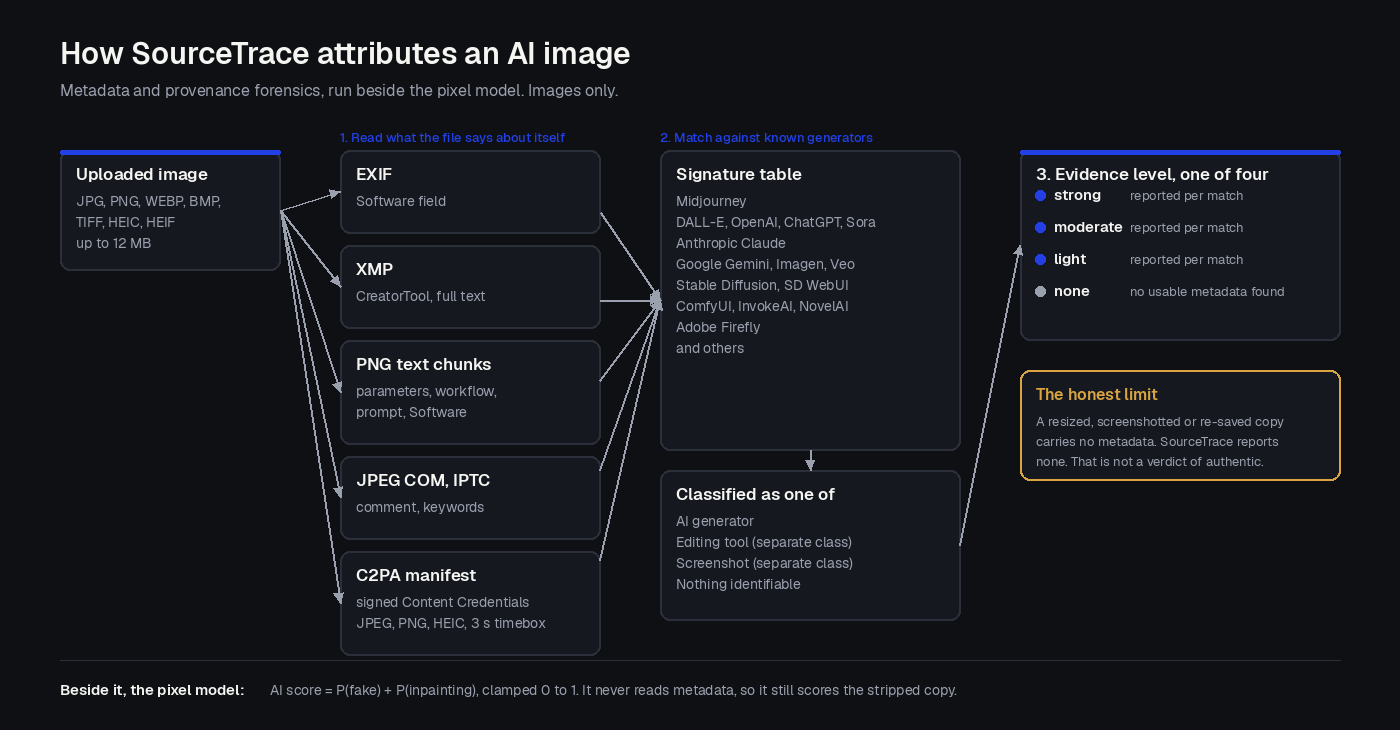
  3. SourceTrace reads what the file says about itselfSourceTrace reads EXIF Software, XMP CreatorTool, PNG text chunks, the JPEG comment, IPTC keywords and the C2PA manifest. It matches what it finds against a signature table of 29 AI generators, 5 editing tools and a screenshot class, and reports an evidence level. This is forensics on the file, not a guess by the model, and it never changes the verdict.

What the verdict means

AI scoreVerdictHow to read it
86 to 100AI GeneratedStrong signs of AI generation across the whole image.
50 to 85Likely AIMore AI signals than natural ones. Treat as probably AI and look for a second signal, such as a SourceTrace match.
16 to 49Likely HumanMore natural signals than AI ones, with some mixed areas. A partial AI edit can land here.
0 to 15HumanNo meaningful signs of AI generation in the pixels.

Thresholds as implemented in the detection platform, verified 2026-10-20.

What the SourceTrace evidence level means

Evidence levelWhat was foundWhat it tells you
StrongA C2PA Content Credentials manifest, or generation metadata written by the tool itself, such as a Stable Diffusion parameters block or a ComfyUI workflow.The file itself says which tool made it. The most reliable attribution available.
ModerateA generator name in EXIF, XMP or IPTC fields, or provenance data that does not name the tool.A real signal from the file, but one a save or export can overwrite.
LightA weak marker, for example a screenshot or export signature.Tells you how the file was captured, not what made the original picture.
NoneNo source metadata at all.Normal for anything downloaded from social media or messaging. Says nothing about whether the image is real.
Attribution

Which AI generator made this image? What SourceTrace can name.

Every other free checker on this search result returns one number. We return the number and, when the file still carries it, the name of the tool.

Diagram of how SourceTrace attributes an AI image: the file's EXIF Software, XMP CreatorTool, PNG Software keys and C2PA manifest are read, matched against a signature table of known generators, and returned with an evidence level of strong, moderate, light or none.
How SourceTrace reads EXIF, XMP and C2PA, then matches a generator signature table.

SourceTrace is a metadata and provenance check that names the generator or editing tool recorded inside an image file. It reads the same fields a camera or an app writes when it saves a picture, plus C2PA Content Credentials, and matches them against a signature table.

The detector scores any image, whichever generator produced it, because it reads pixels. Attribution is different. A generator can only be named when the file still carries its signature. These are the tools in the current signature table.

AI generators SourceTrace can name

  • Midjourney
  • DALL-E
  • OpenAI, ChatGPT and Sora
  • Anthropic Claude
  • Google Gemini
  • Google Imagen
  • Google Veo
  • Stable Diffusion
  • Stable Diffusion WebUI
  • ComfyUI
  • InvokeAI
  • NovelAI
  • Adobe Firefly
  • Flux (Black Forest Labs)
  • Leonardo AI
  • Ideogram
  • Runway
  • Kling AI
  • xAI Grok
  • Luma AI
  • Pika
  • Recraft
  • PhotoRoom
  • Picsart
  • Bria AI
  • SeaArt
  • Microsoft Designer, Bing Image Creator and Copilot
  • Meta AI

Editing tools and screenshots are reported separately

Adobe Photoshop, Adobe Lightroom, GIMP, Canva and Affinity Photo are classified as editing tools, not generators. If the last tool to save a file was Photoshop, SourceTrace says so and does not call the image AI generated. Screenshots and screen exports get their own class, because a screenshot of an AI image carries the screenshot tool's signature, not the generator's.

Signature table as implemented in the detection platform, 29 generators, 5 editing tools, 1 screenshot class. Verified 2026-10-20.

The honest limit

Why does the result say "no source metadata"?

Because the metadata is gone, and that is the normal case. No competitor tells you this. We would rather you know.

A resized, re-saved or screenshotted copy of an image usually carries no metadata, and without metadata SourceTrace has nothing to read.

Most social platforms and messaging apps strip EXIF and XMP on upload. Resizing in an image editor rewrites the file. A screenshot creates a brand new file that knows nothing about the original. In each case SourceTrace reports none, and the result panel says so plainly.

Three things follow. First, a blank SourceTrace result does not mean the image is real. Second, the verdict and AI score do not depend on metadata at all, so they still apply. Third, when you can, check the original file rather than a copy, because that is where the evidence lives.

The reverse is also true. A strong SourceTrace match on a Midjourney or Firefly file is evidence from the file itself, independent of the model, which is why we show it next to the score instead of folding it in.

Deepfake image detector

Does it catch face swaps and edited photos?

The detector scores inpainting on its own, which is how partial AI edits show up in a mostly real photograph.

A deepfake image is a real photograph in which a region, usually a face, has been replaced or regenerated by AI.

Most free AI checkers answer one question: was this whole picture generated? A face swap or an AI-filled background fails that test, because most of the pixels are a real photo. Our model returns a separate probability that part of the image was inpainted, and that probability counts toward the AI score. A convincing swap on a real photo can therefore land in Likely AI or Likely Human rather than Human, and that is the signal to look harder.

What this page does not do: it does not draw a box around the edited region, and it does not separate a classic manual retouch from an AI one. The verdict is whole-image. For an explanation of edited versus generated, read edited vs AI generated images: how to tell them apart.

Check by eye

Is this image AI? Signs you can check yourself.

Use these alongside the score, especially for a Likely AI or Likely Human result.

  • Hands and teeth. Count fingers and look at how they join the palm. Teeth that merge or repeat are a common tell.
  • Text in the image. Signs, labels and logos that look like letters but do not spell anything.
  • Reflections and shadows. A mirror or window that does not show what it should, or shadows that fall in two directions.
  • Background logic. Buildings that do not meet the ground, railings that change pattern, objects that merge into each other.
  • Skin and fabric texture. Skin that is uniformly smooth, or fabric with a repeating pattern that drifts.
  • Metadata. Open the original file's properties. A C2PA Content Credentials label, or a generator name in the software field, is the same evidence SourceTrace reads.

The full walkthrough is in how to tell if an image is AI generated. For what happens inside a detector, read how AI image detectors work.

Free and paid

Is this AI detector for images free?

Yes. The checker on this page needs no account. An account adds volume, bigger files and history.

OptionChecksFile limitSignupBest for
Free checker on this page10 a day4.5 MBNoneChecking a picture right now
Free account50 a month12 MBEmail, no cardSaved results, image, video and voice in one place
Starter and aboveFrom 1,000 a month12 MBPaid planTeams, plus API access for moderation and verification workflows

Limits as published on pricing and configured in the detection platform, verified 2026-10-20.

FAQ

Frequently asked questions.

If yours is not here, mail hello@deepfakedetector.ai.

How can I check if an image is AI generated? +

Drop the image into the free checker on this page. You get a whole-image verdict, an AI score from 0 to 100, and a SourceTrace result that names the generator when the file's metadata or C2PA credentials still carry it. For a borderline score, also check the image by eye: hands, text, reflections and background logic.

Does the detector say which AI generated an image? +

Yes, when the evidence is still in the file. SourceTrace reads EXIF, XMP, PNG text chunks and the C2PA manifest and matches them against a signature table covering Midjourney, DALL-E, Stable Diffusion, Firefly, Gemini, Flux and others, with a strong, moderate, light or none evidence level. A resized, screenshotted or re-saved copy usually carries no metadata, and SourceTrace reports none.

How accurate is the AI image detector? +

We do not publish an accuracy percentage, because a single number hides how much results vary by generator, compression and image size. Treat the score as evidence, not proof. A strong SourceTrace match is independent evidence from the file itself. For decisions that matter, combine the verdict, the source result and your own inspection.

What file types and sizes does the free checker accept? +

The free checker accepts JPG, PNG, WebP, BMP, TIFF and HEIC images up to 4.5 MB, ten checks a day per visitor, with no account. A free account raises the file limit to 12 MB and gives 50 checks a month. Send the original file rather than a screenshot, because a screenshot loses the metadata SourceTrace reads.

Does it work on screenshots? +

Yes for the verdict, no for attribution. The detector scores the pixels of any image, so a screenshot still gets a verdict and an AI score. SourceTrace classifies the file as a screenshot or export and cannot name the original generator, because capturing the screen discards the original file's metadata and any C2PA manifest.

Check any image
in seconds.

Verdict, AI score, and the generator's name when the file still carries it. Free, no signup.